Discord Checkpoint 2025: Spotify Wrapped Style Gaming Recap Guide
Discover Discord Checkpoint 2025, the first year-in-review recap for gamers. See your voice chat hours, top friends, most played games, and emojis with simple steps to view and share it.

Discord now drop first time end of year recap and many people get shock how many hours they spend chatting with friends online. The feature name is Discord Checkpoint, and it kind of feel like Spotify Wrapped but for voice chat, gaming habits and emojis you spam too much.
What Is Discord Checkpoint?
From Dec. 4, 2025, Discord start rolling out Checkpoint for users. This is first year they doing this year in review thing because app is now 10 years old and they want celebrate with everybody. They not fully promise it will come every year, they only say plans after 2025 are still unfolding, so maybe next year also, maybe not, nobody sure.
Discord Checkpoint show different type of stats from your year, like:
- how many hours you sit in voice chat with friends
- which friends you talk the most whole year
- which servers are your favorite hangout place
- emoji you use again and again like crazy
- games you play most and how many sessions
You can share your Checkpoint directly inside Discord with the Share button on final screen, or you just screenshot and post it on X, Instagram or wherever you want flex your gamer life.
Who Can Get Discord Checkpoint?
Not every user is getting this recap. Checkpoint is only for people who was active on Discord in 2025 and who allow Discord to use data to personalize their experience in data and privacy settings. New users or people who barely open app in 2025 will not see Checkpoint, because there not enough data for make nice recap for them.
How To See Your Discord Checkpoint
For many users, when they open Discord app, a pop up shows automatically and tell them to view their Checkpoint. This works on both desktop and mobile app. If you miss the popup or it not show, you still can open it manually.
On Desktop
On desktop version, just open Discord and look on top right corner. Click the little flag icon and it will open your Discord Checkpoint if your account have one.
On Mobile
On mobile app, first tap the You icon at bottom right. After that, you will see a big green Checkpoint banner. Tap on it and your year in review page will open.
If your Discord Checkpoint still not show anywhere, maybe your app is old version. Desktop app usually update by itself when you close and open again, but mobile app sometimes need manual update from Google Play Store or Apple App Store.
Extra Bonus: Profile Frame
When you view your Discord Checkpoint, you get a special decorative frame for your profile picture. It is temporary but look pretty nice flex for your profile. You can use this frame until Jan. 15. After that date, both the frame and the Checkpoint page will disappear.
Even if you do not have enough data for full Checkpoint, you can still try to open it and grab the frame anyway. So users who miss whole recap still can use the design on their profile.
What Discord Share About All Users in 2025
Discord also release a big global wrap up from more than 200 million monthly active users around world. It show what whole community is doing, not only you. Some of the most interesting points are here:
- League of Legends is still most popular game on Discord, even when it is now 16 years old.
- R.E.P.O. become one of the biggest indie co-op survival horror games in community.
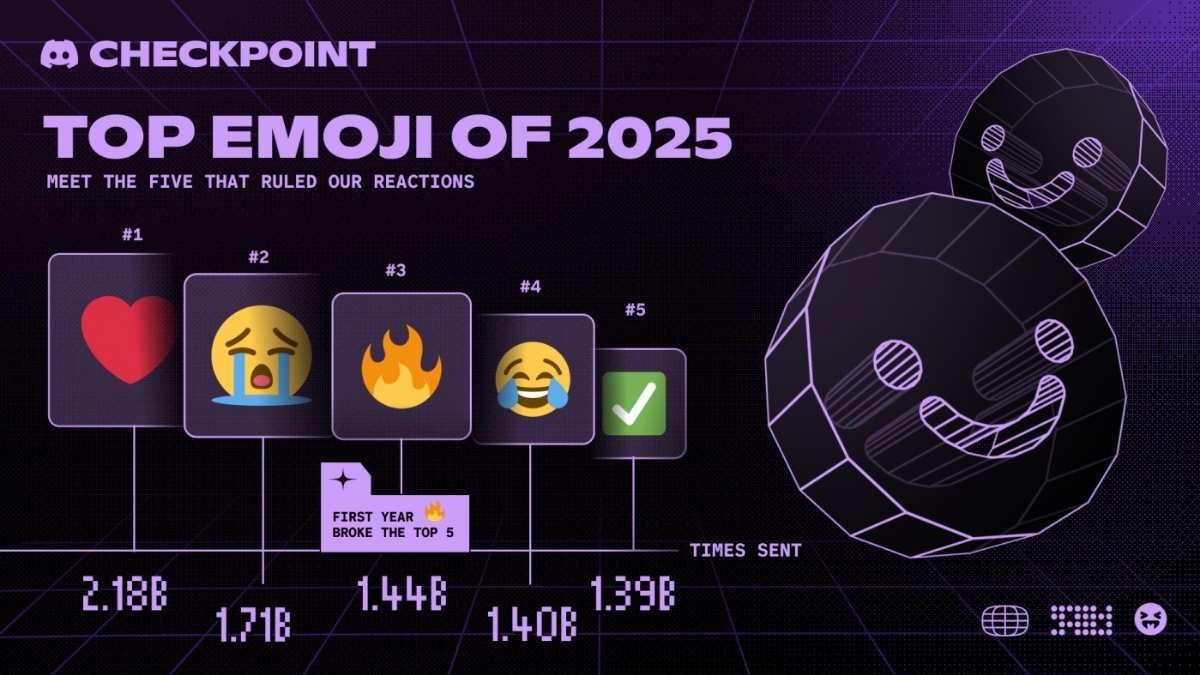
- The most used emoji on Discord is the red heart ❤️, used around 2.18 billion times.
- The second most used emoji is the sobbing emoji 😭 with around 1.71 billion uses.
So clearly, gamers not only shouting in voice chat, they also sending lot of feelings through emojis.
Why Discord Checkpoint Feel Important For Users
Discord Checkpoint is not only about numbers. It kind of show how much online friendships and communities becoming big part of daily life. Many people spend long nights talking in voice channels, screaming “push mid”, sharing memes or just chilling with friends when life feels heavy. When you see your recap, you can remember funny moments, late night raids, last minute rank pushes and all chaotic games from whole year. It make people feel more connected with their server, friends and gaming journey.
Should You Check Your Discord Checkpoint?
If you use Discord regular this year, definitely you should open your Checkpoint once. It only take few minute and you might be surprised how many hours you spend in voice chat or which friend you message more than your own family. Also, you get the profile frame as bonus, so no real reason to skip it.
Just open Discord, look for popup, flag icon on desktop or green banner on mobile, and see your stats. It is simple, kind of funny, and little bit scary when you realize how much time you living online with your squad.
After you see it, you can share screenshot on social and compare with friends who is really the most
addicted gamer in squad this year.
Also Read :-Cary-Hiroyuki Tagawa Dies at 75: Mortal Kombat Actor